Android 17 Update On Google Pixel: Eligible Devices, Features, And Release Date
Summary
- Codenamed Cinnamon Bun, Android 17 is set to release this summer
- From bubbles for multitasking to a native desktop mode, it brings several new features.
- Here's a complete roundup of everything coming in Android 17.
Update: We last updated this article with new features on May 13, 2026
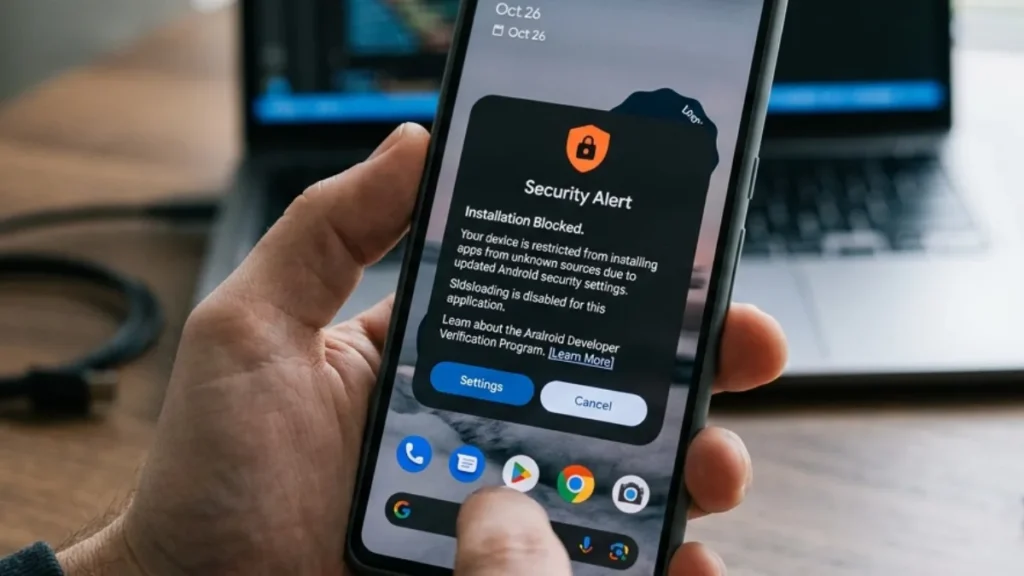
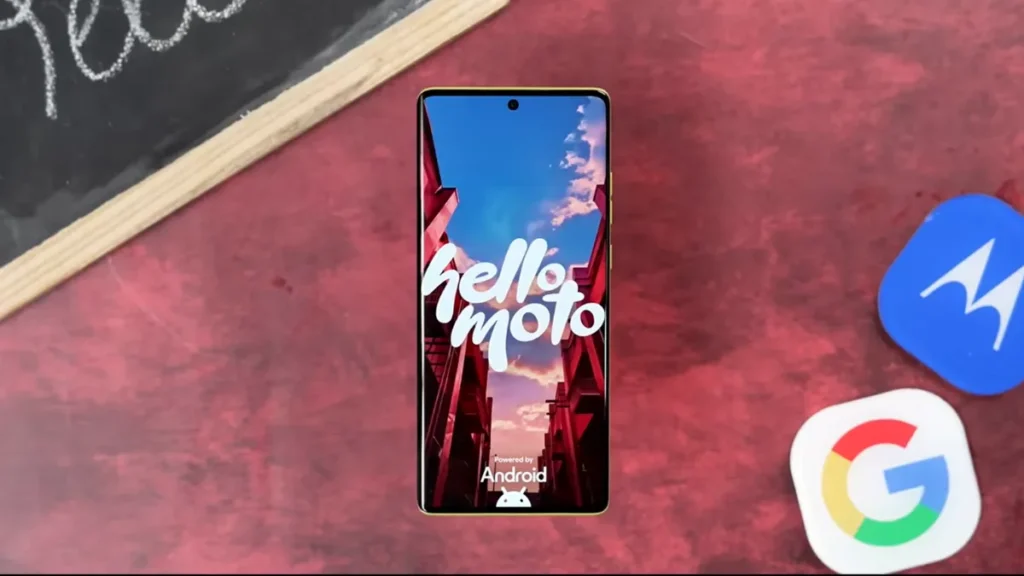
While you are still waiting for Android 16, Google is already cooking the next version of its operating system. Android 17 update is just around the corner, and Pixel owners will be the first to get it. From new multitasking bubbles to a long-awaited desktop mode and the return of lockscreen widgets. Here’s everything you need to know about the Android 17 update.
What is Android 17’s name?
The dessert name for Android 17 is Cinnamon Bun, a soft, sweet roll filled with cinnamon and sugar, usually topped with white icing. Although Google has stopped using desert names since Android 10 and switched to a numerical pattern, it still uses codenames internally.
The company decided to reset these codenames with Android 16, hence the codename “Baklava” for Android 16. So where’s A? Well, Android 14 QPR2 had the build letter A, and Google didn’t want any conflict branch, so it went with B.
Android 17 Features
1. Gemini Intelligence
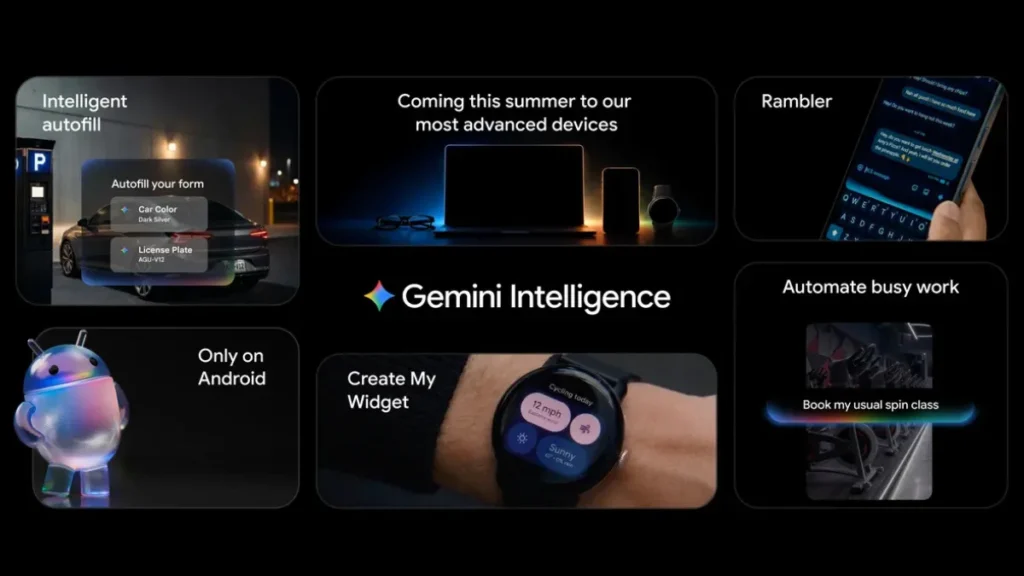
One of the biggest feature in Android 17 is Gemini Intelligence. This is Google’s version of Agentic AI that can do everything for you. Whether it’s booking concert tickets or adding items to your cart, Gemini can handle everything. Gemini Intelligence is coming to Pixel 10 and S26 series this summer with the following features:
- Browsing Assistant In Chrome: Gemini Intelligence is getting a new Auto Browse feature that lets you research, summarize and compare content across the internet. It can handle tasks such as booking an appointment or reserving a parking slot.
- Support for Third-Party Apps: Gemini Intelligence works with not just Google apps but also third party ones.
- Improved Autofill: Autofill has been a godsend feature and it’s getting better with Android 17 update. It can automatically fill relevant details across apps including Chrome and is now powered by Gemini.
- Rambler: Love yapping? Well, with Gemini Intelligence’s Rambler feature is the most advanced text to speech converter. It can understand natural commands, including your pauses, corrections, and filler words. And you even switch between English and Hindi seamlessly and transcribes in real time.
- New Material 3 Expressive UI: Gemini Intelligence comes with a new liquid glass frosted green UI that keeps the task in focus while reducing other distractions.
- Improved Privacy: Google knows that privacy is a major concern with Gemini Intelligence and it’s working on this. You can opt in or opt out of features and Gemini requires confirmation before making a purchase. Users can control how their data will be used when accessing Gemini Intelligence.
2. Create Your Own Widgets
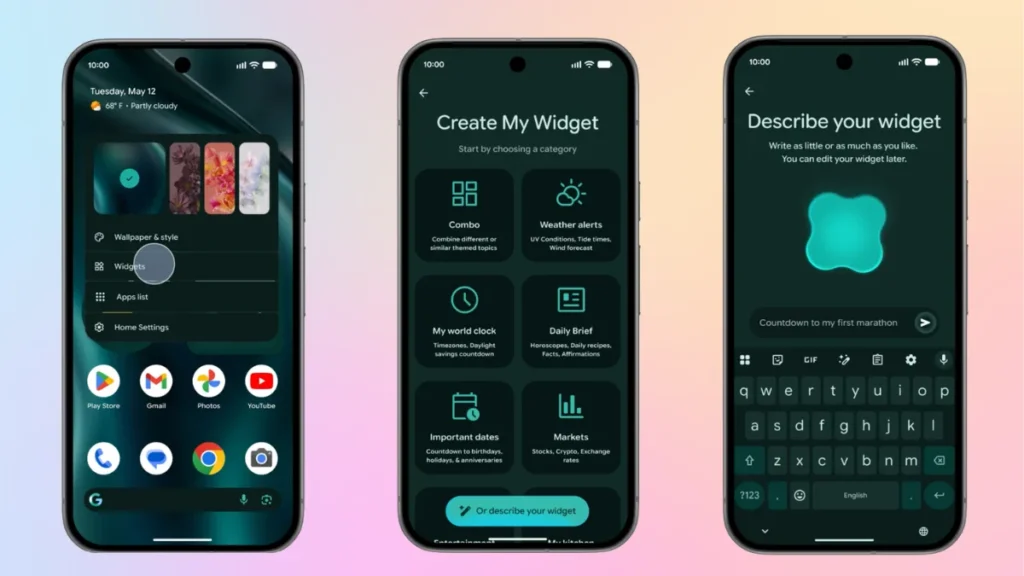
Taking a page out of Nothing’s Playground feature, Google now lets you create your own widgets. With the Create My Widget feature, you just describe the widget to Gemini using natural commands, and it will do the rest for you. For instance, if you can create a widget to notify you about upcoming F1 races or a widget to suggest healthy breakfast options every morning. This feature will be available on Android 17 phones as well as WearOS smartwatches.
3. Bubbles For Multitasking
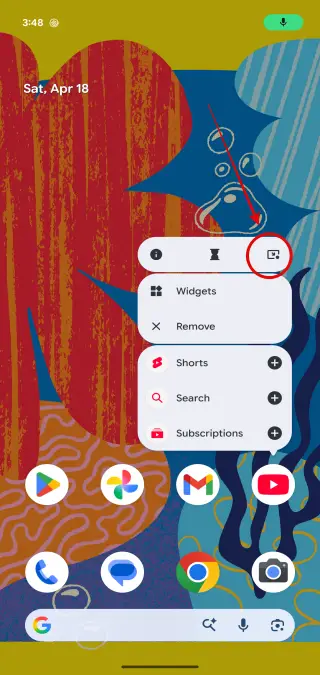
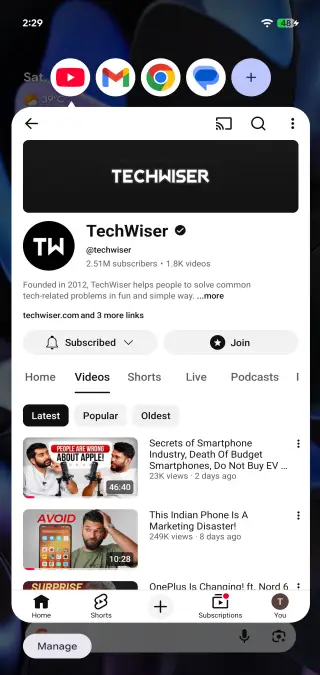
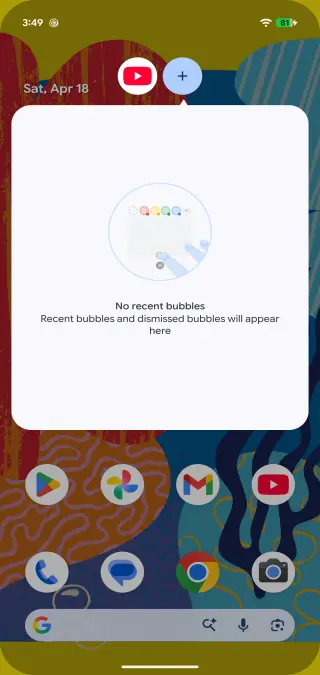
Google introduced the concept of bubbles with Android 11 for messaging apps. With Android 17, they are making a strong comeback, and you can now open any app in bubbles. It lets you open upto five apps and easily switch between them. The best part? You can use multiple bubbles at the same time, move them around, press + to find recent bubbles, and more. It’s a more useful and refined version of the splitscreen mode currently available.
4.Take a Break With Pause Point
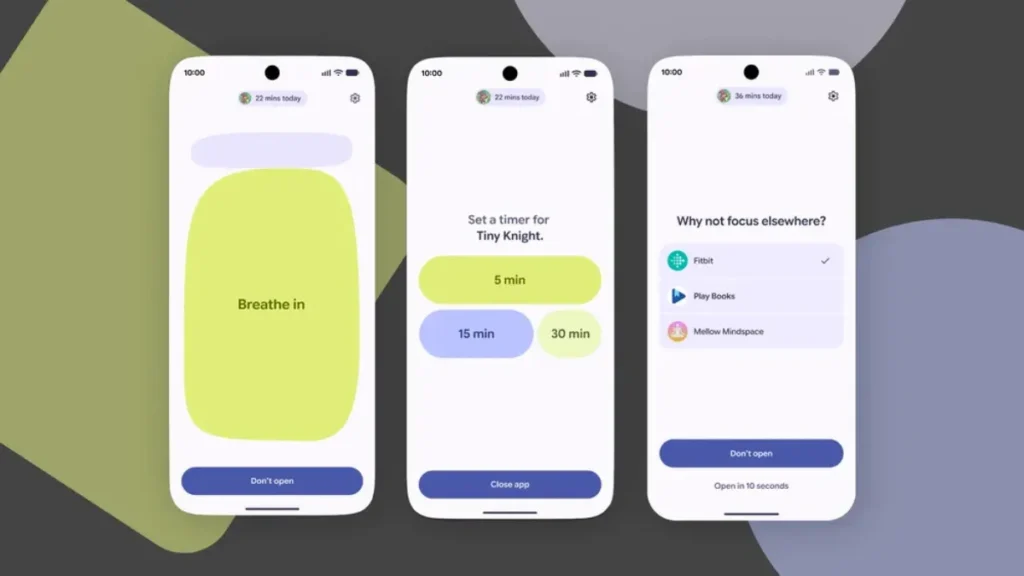
We’ve all been there, you pick up your phone to handle a quick task only to end up spending an hour scrolling through reels. Android 17 update is tackling this head-on with a clever new feature called Pause Point. It lets you mark distracting apps in the Settings so you can focus better.Now, whenever you try to open a distracting app, the system triggers a mandatory 10-second timer, forcing you to pause and pivot. During this brief window, you can do a quick breathing exercise, set a timer for an audiobook, or look through your own photos instead. To make sure you actually stick to your goals, disabling the feature requires a full phone restart.
5. New Creator Tools
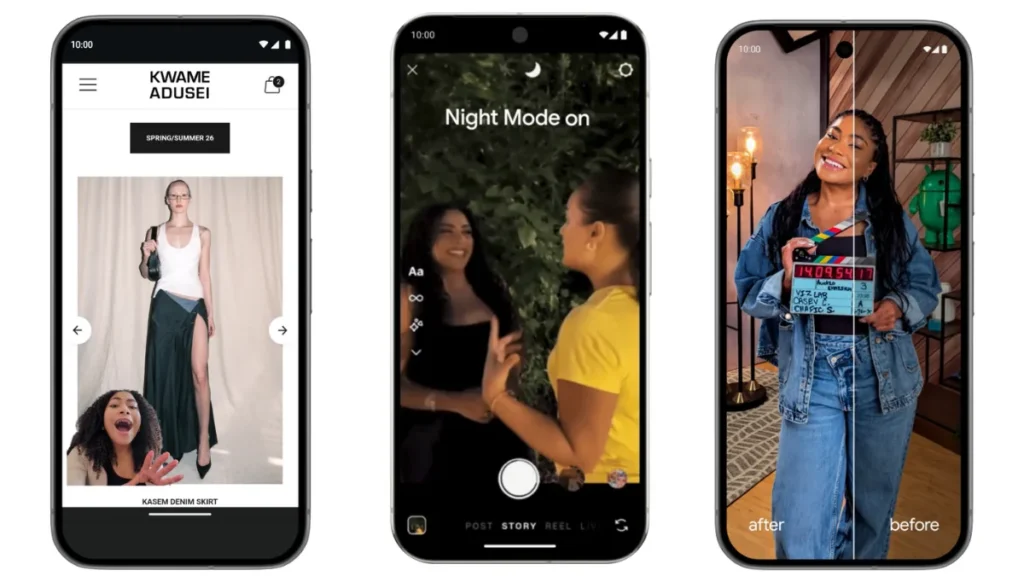
Creators have always swore their loyalty to iPhones and Google knows this. To take a share out of this pie, Google is introducing new tools for Android users:
- Screen Reactions: Remember those Tiktok style video reactions? You can now recreate those without using third party apps. With Android 17, you can create those reactions natively without switching your screen. Just start recording your self and it will impose an overlay of your face over whatever app, image or website you are browsing.
- Adobe Premiere On Android: Google is bringing Premiere to Android making your phone a powerful workstation. It is also optimized for tablets and will have a exclusive templates as well as effects for YouTube Shorts
- APV Codec Support: Advanced Professional Video (APV) codec is coming with Android 17 update. This is a storage efficient codec that uses hardware acceleleration feature of the Snapdragon 8 Elite Gen 5. It is available on the Vivo X300 Ultra and Samsung Galaxy S26 Ultra apart from other Snapdragon 8 Elite Gen 5 phones later this year.
- Improved Instagram Experience: Instagram has always been optimized for iPhones and Android 17 wants to challenge Apple’s hegemony. Google is working directly with Meta to optimise the experience on flagship phones. It now supports Ultra HDR, Night Sight and you can even enable OIS. Google claims the video quality is better than iPhones and Instagram now supports Android tablets.
- New Features on Instagram Edits app: Google is also working with Meta to improve the Edits app. You can now enhance videos and photos with the Smart Enhance feature while the Sound Seperation feature can identify audio tracks, letting you remove or boost the ones you want.
6. Split Notification Panel
Google has been one of the few companies that haven’t adopted the split-screen notification panel. But with the Android 17 update, Pixel phones will have the option to switch to a split quick settings. So if you swipe down right from the left, you will see new notifications, while swiping down from the right will give you access to the quick settings. Since this is an optional change, you can always revert to the combined notification panel in the settings. Also, foldables and tablet owners
7. Force Dark Mode And Enhanced HDR Brightness
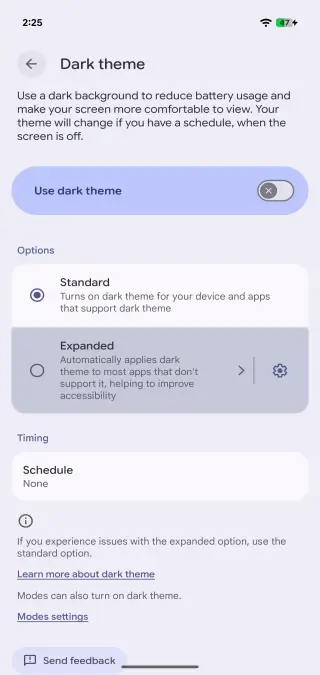
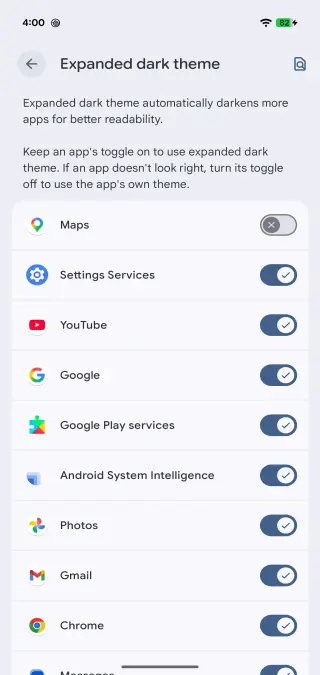
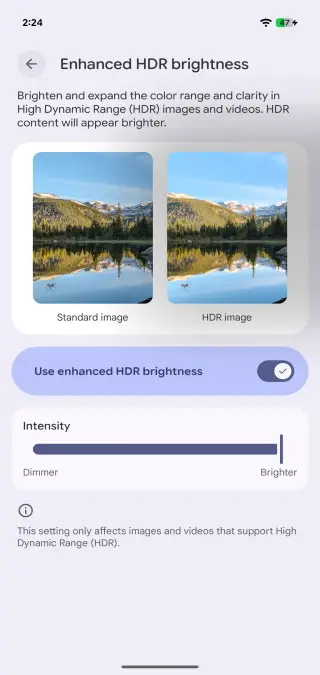
Dark mode is a godsend, especially for phones with AMOLED panels. If you have switched over to the dark side, you must have noticed that many third-party apps still don’t support the feature. But with the Android 17 update, this will soon change, as you can force enable dark mode even in unsupported apps. Another change is the enhanced HDR brightness mode, which boosts HDR brightness, and you can even control its intensity.
8. Redesigned Screen Recording
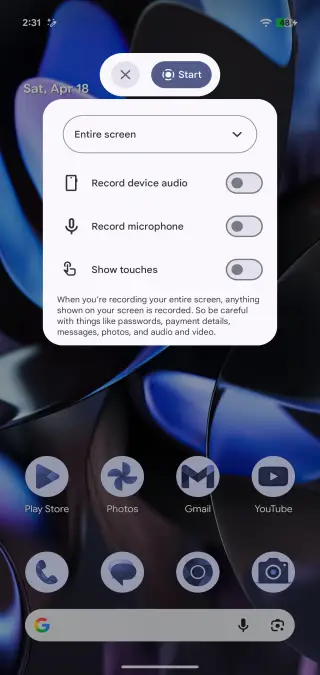
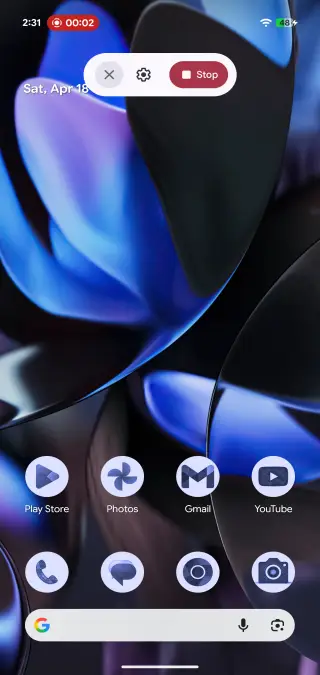
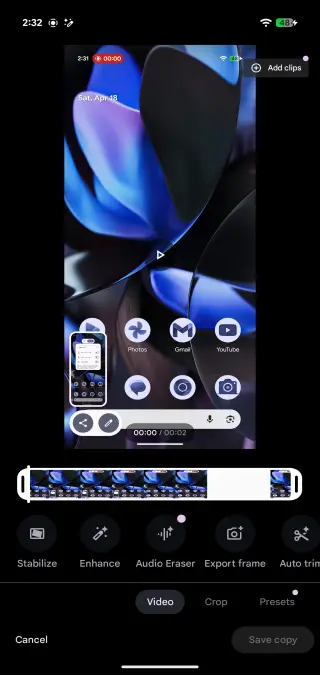
Android 17 will also introduce a redesigned screen recorder. It has an improved UI, and you can choose a single app to record instead of the entire screen. There’s also an option to annotate your recording without saving it and share it directly. You can also change the recording settings and add a dedicated stop button. You can also choose to record just the system audio, mic audio, and even show touch inputs from this menu.
9. Limited Contact Sharing
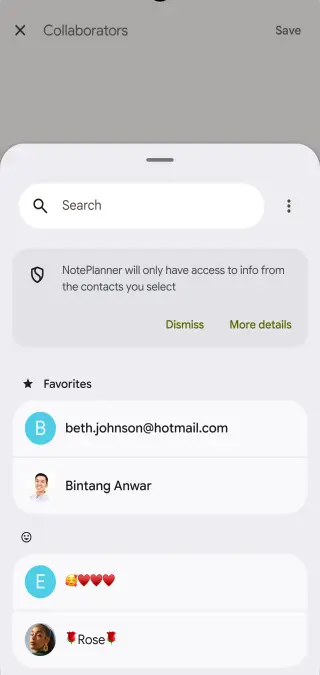
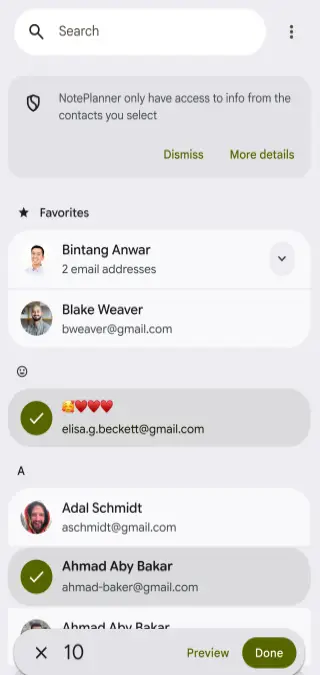
Android 17 will let you choose which contacts to share when an app asks for the contacts permission. This feature will work similarly to the photo picker and file picker features available in Android. It’s a great feature that lets you preserve your privacy and select only specific contacts with an app. Also, apps won’t be able to keep track of any changes you make to a contact.
10. Cross-Device Continuity
Ecosystem and continuity features are iOS biggest strength, and Google wants to borrow a page out of Apple’s notebook. Google is working on a new cross-device continuity feature that lets users start an activity on one device and continue doing it on another device. This means you will be able to sync notifications, files, and app data across devices. So if you’re ordering something from Amazon on your tablet or laptop, you can pick up where you left off on your phone. You can copy and paste things from your phone to your laptop and vice versa with the new universal clipboard feature.
Also Read:
- OxygenOS 17 Update: Release Date, Eligible Devices, and Features
- Xiaomi HyperOS 3.1 Update: Eligible Devices, Release Date, and Features
- ColorOS 17 Update: Eligible Devices, Features, and Release Date
11. App Lock
A major missing feature from Pixel phones is the ability to lock apps. With Android 17, Google is finally adding the option to lock apps. While we did have Private Space, it is only meant for rarely opened apps since these are hidden from the general view. Also, apps in Private Space run in an isolated profile, which can be an issue when opening an app multiple times daily. The app lock feature will not only work across all apps and launchers but also hide the contents in the notification panel. It can be useful for locking your banking apps or those spicy apps you don’t want anyone else to see.
12. Desktop Mode
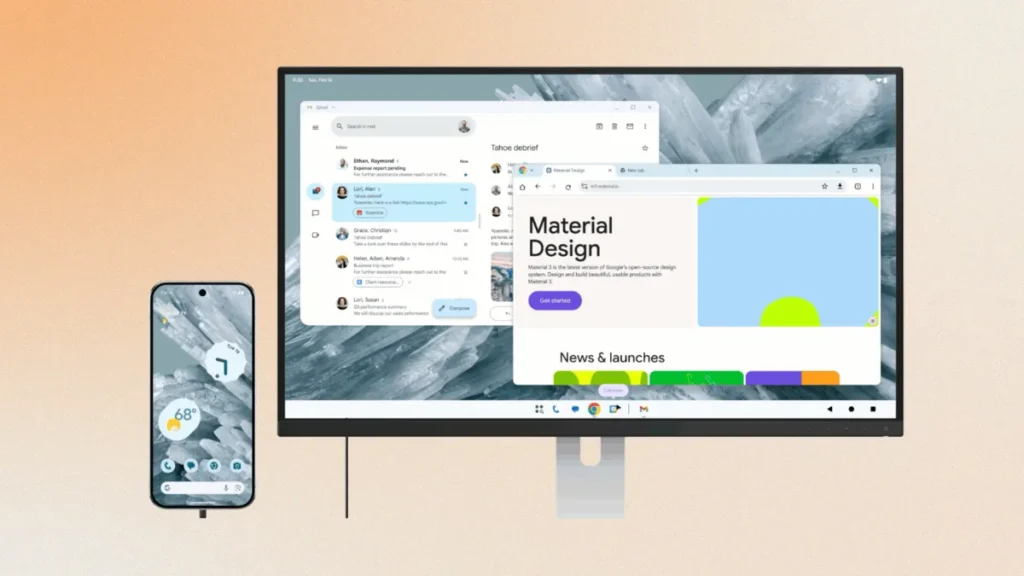
Android 17 update could bring the much-awaited Desktop Mode that we have been hearing about. Just like Samsung Dex, you need to connect your phone to a monitor and boom! Your phone turns into a full-fledged PC. It will show a desktop interface where you can open apps side by side and even has a taskbar similar to Windows. While we have seen Desktop mode from Samsung and Motorola, we are finally seeing a native implementation in Android.
13. Separate Wi-Fi and Mobile Data
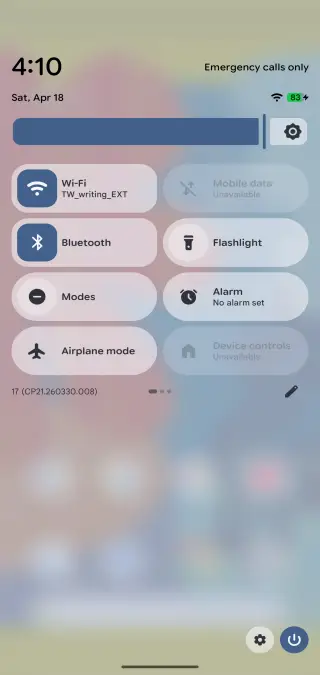
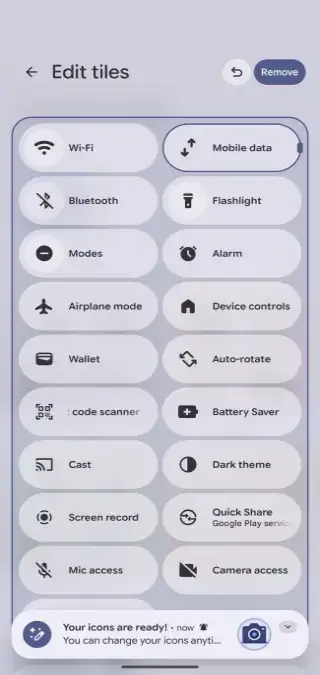
Google seems to have finally heard the prayers of hardcore Android users with separate toggles for Wi-Fi and mobile data. Previously, users had to struggle through a combined Internet toggle to turn on Wi-Fi and mobile data. Now, Android 17 update wants to address this issue by unifying Wi-Fi and mobile data.
14. Translucent Design And Force Theme Icons
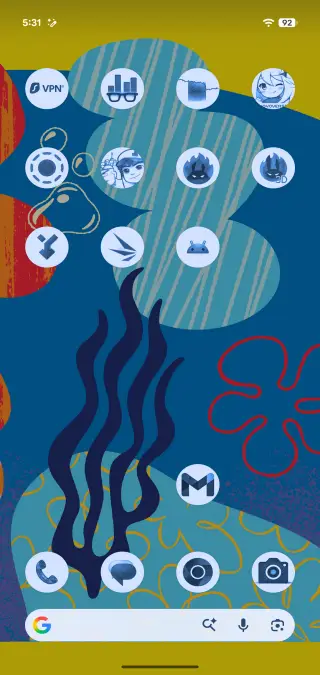
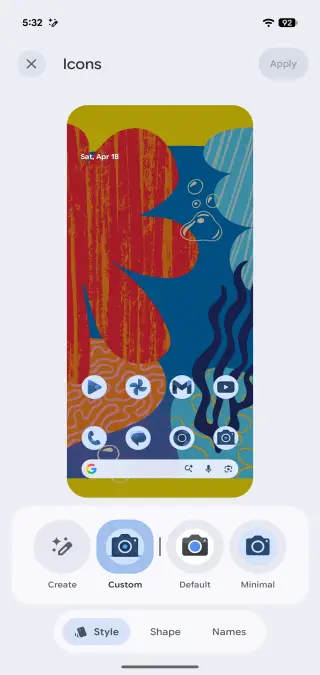
With Liquid Glass being the ongoing trend, Google wants a share of the pie, too. Android 17 will adopt a new translucent design with system blur across the board. This frosted glass design will be visible across the notification panel, volume bars, widgets bar, and even the quick share menu. And just like the force dark theme option, you will be able to force third-party icons that don’t support Material You for a unified look.
15. Widgets On Lockscreen
Google is bringing back lockscreen widgets from the dead. Initially introduced in Android 4.2 Jellybean, Android 17 is reviving lockscreen widgets. It will be available in a new hub mode that can be accessed by swiping left on the lockscreen, similar to how you access Google Discover on your homescreen. This hub mode will let you view both system widgets as well as third party similar to the Today View feature from iOS. The only limitation is that you can have three widgets on a page, and you cannot adjust the width. But there’s no limit on the number of pages
16. Live Updates
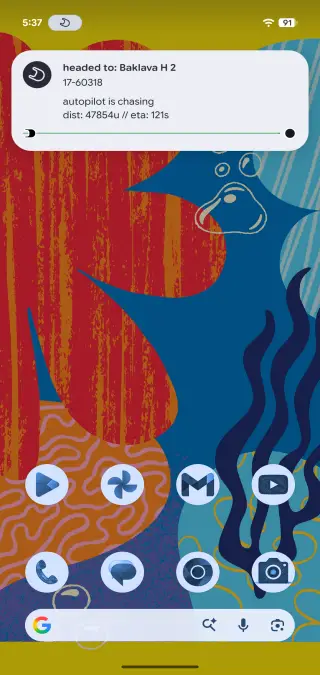
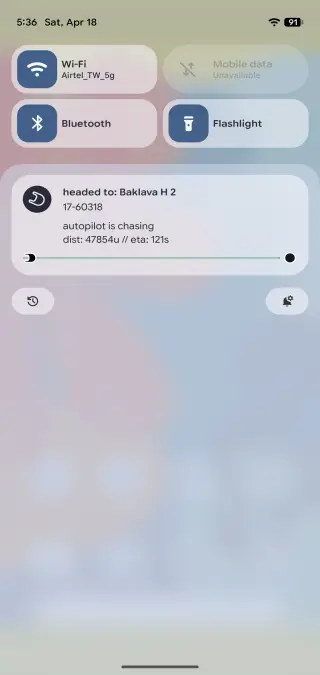
Live Updates, just like Apple’s Dynamic Island, are expected to debut with Android 16, but they never made the cut. With Android 17, live updates will show you the status of your food delivery or cab booking so you can keep track. It will be visible on the AOD, lockscreen, status bar, and heads-up display. Although developers will also need to implement the API in their apps for the feature to work.
17. Other Changes
Just like every other Android update, there are minor but noticeable changes across the board. Here’s a rundown for them:
- New No Notifications message: Android now shows a “You’re all caught up” message similar to the Pixel Watch when you dismiss all notifications.
- New Easter Egg: Android 17 finally brings a new easter egg, which requires users to play a small game of “connect the dots”. Once done, you will see the Android logo moving through Space.
- New Location Button: Want to give an app access to your location for a one-time use? Google is working on a new button for this use case.
- Priority Charging: Google’s priority charging feature pauses background activity and allocates all resources to charging to fast-charge your device. You will need an adapter with 30W or higher, and the feature also keeps the temperature in check.
- Strict memory limits for third-party apps: A rogue app using all your RAM in the background? Android 17 will have device-specific limits and actively monitor to terminate those that go beyond your device-specific limit. This should terminate any rogue apps that slow down your phone in the background.
- Volume Slider for Google Assistant: If you are tired of Gemini screaming on your phone, you can adjust its volume without muting your system volume.
- Better Privacy Indicators: Privacy indicators on Android are currently shown in all green. They will have their distinct color, with the location shown in blue and the camera in green. Also, these icons are now circular instead of a single pill.
- OTP Protection: Android 17 update preserves your privacy by preventing non-relevant third-party apps from reading your OTPs for up to three hours.
- Compatibility for bigger screens: Android 17 will make it mandatory for developers to optimize apps for the bigger screen. This will be helpful for foldables and other emerging form factors since apps won’t be able to restrict the ability to resize and screen orientation.
- Squarish Permissions UI: The permissions UI in Android 17 is now squarish instead of rounded. This highlights the options and makes it much easier and clearer to choose between the two.
- Faster Camera Switching: Android 17’s new Dynamic Camera Sessions feature will reduce the lag when switching between capturing photos and shooting videos in the camera app.
- Unified Accounts and Backup section: The accounts and backup section is now unified. Previously, there was a separate section for “Backup or copy data” and “Passwords, passkeys & accounts.”
- Satellite Connectivity Quick Toggle: Android 17 update brings a new satellite connectivity
- Eyedropper app: Android 17 brings a new Eyedropper app that lets Android apps pick the exact color of any pixel on the screen.
- Scheduled clock change alerts: Your phone will notify you when the clock performs a scheduled change, such as daylight saving time.
- Double-tap to lock: Android 17 will finally let users double-tap to lock their phone, a feature that has been missing from Pixel phones.
- Enhanced Theft Protection: If your phone gets stolen, Android 17 will make it harder for thieves to sell it. If a phone is reset, the setup process will have a stringent verification process.
- Remove At A Glance Widgets: The annoying “At A Glance” widget can finally be removed, and you can now get rid of this eyesore.
- Hide apps on homescreen: With the Android 17 update, you can hide apps on the homescreen for a cleaner and more minimalistic look.
- Game controller remapping: Android 17 update will let users remap controllers in games natively in Android. You can customize the function for every trigger, button, and joystick.
- 3D Emojis: From blob emojis to adorable flat ones, Android has come a long way. With the Android 17 update, Google is bringing a new 3D emojis. There is a subtle yet noticeable change as people have often complained about emojis look too boring compared to iPhones.
- Live Threat Detection: With the Android 17 update, your system will now scan apps for malicious behaviour in the background. It will now check SMS Forwarding, hidden backgorund launches or settings with accessiblity overlays.
- MotionAssist: If you are averse to motion sickness, the Motion Assist feature can come in hand by showing on screen movements to reduce sickness in a moving vehicle.
- Revamped Android Auto: Android Auto now uses Material 3 Expressive design with smoother animations and fonts. It now supports all different screen shapes and sizes and you can even play YouTube videos when idle. Although it switches to audio only as soon as you start driving.
- Improved Mark as Lost: You can now remotely lock a phone after marking it as lost. And to unlock the device, you will need biometric as PIN or password won’t work.
Android 17 Update Eligible Devices
The Android 17 update is coming to five generations of Pixel phones, going all the way back to the Pixel 6 series. Interestingly, Google has extended the support for the Pixel 6 series, Pixel 7 series, Pixel Fold, and even the forgotten Pixel tablet by two years. Here are all the devices set to receive Android 17:
| Series | Model |
|---|---|
| Number Series | Pixel 6, Pixel 6 Pro, Pixel 7, Pixel 7 Pro, Pixel 8, Pixel 8 Pro, Pixel 9, Pixel 9 Pro, Pixel 9 Pro XL, Pixel 10, Pixel 10 Pro, Pixel 10 Pro XL |
| Fold Series | Pixel Fold, Pixel 9 Pro Fold, Pixel 10 Pro Fold |
| A Series | Pixel 6a, Pixel 7a, Pixel 8a, Pixel 9a, Pixel 10a |
| Tablet | Pixel Tablet |
Android 17 Update Release Date: When Is It Coming Out?
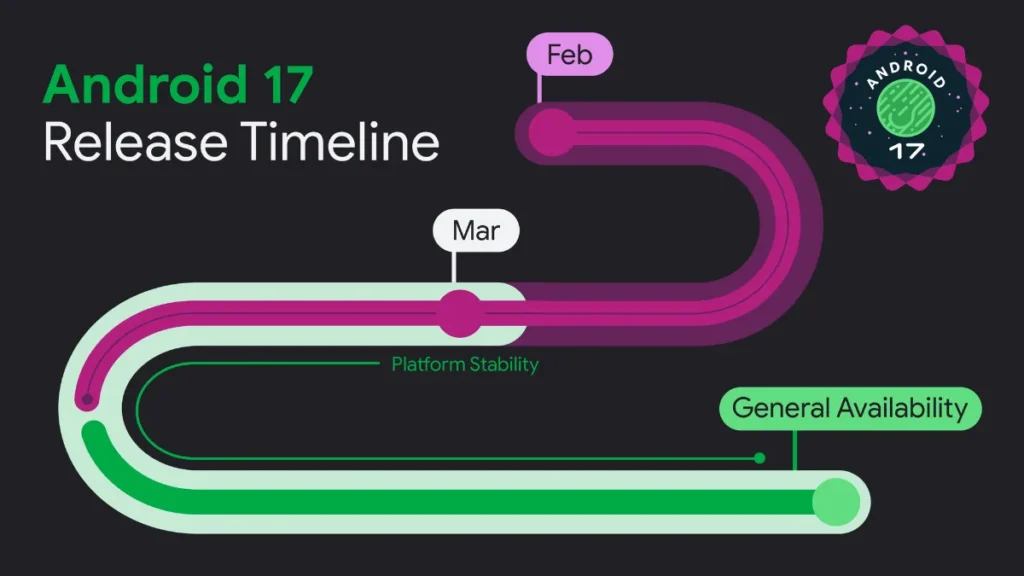
Android 17 is all set to debut this summer for Pixel devices. Since Google has ditched Developer Previews for beta for the first time, the rollout is significantly faster this time. Google released its final beta for Android 17 and is preparing the final update now.
Given that Android 17 Beta 4 rolled out on April 16, 2026, we can expect the stable version to debut sometime in June or July. It will first arrive on Pixel phones, followed by other smartphone OEMs rolling out to their own customized skins and UI.
Android 17 Beta: How to Install?
Currently, Android 17 is beta 4, the last beta ahead of the official release. This time, there is no Android 17 developer preview, and Google is directly giving us a taste of the beta. It is the final milestone before the stable version rolls out later this summer. All devices that are eligible for the update can install the open beta.
Note: Beta programmes can have bugs and issues, so installing them on your primary phone isn’t recommended. Once you opt into a beta, you will continue receiving beta updates until you opt out.
If you want early access to Android 17 and try it out for yourself, here’s how to do so:
- Go to the official Android 17 beta website and sign in with the same Google account as your Pixel phone.
- Click on opt-in next to your device and then wait for an hour.
- On your Pixel phone or tablet, go to Settings->System->Software Updates->System Updates section.
- Press Install and wait for the update to finish installing on your device.
FAQs
1. Is Android 17 in beta?
Yes, Android 17 is currently in beta 4, the last beta before the stable version rolls out.
2. Which devices are eligible for Android 17 Developer Beta?
All Pixel phones that are eligible for the stable Android 17 update can install the beta version on their devices.
3. When Is Android 17 Update Coming To My Pixel Phone?
Android 17 is likely to be released in June or July for all eligible Pixel devices.
4. What is the biggest feature of Android 17?
Android 17 will bring some highly anticipated features, such as Lock Screen Widgets, Multitasking Bubbles, Desktop Mode support, split notification panel, cross-device continuity, and more.